
AI task management for store chains
Send a task from HQ, see the photo proof, and know which stores executed. Without chasing.
Every task reaches the right person
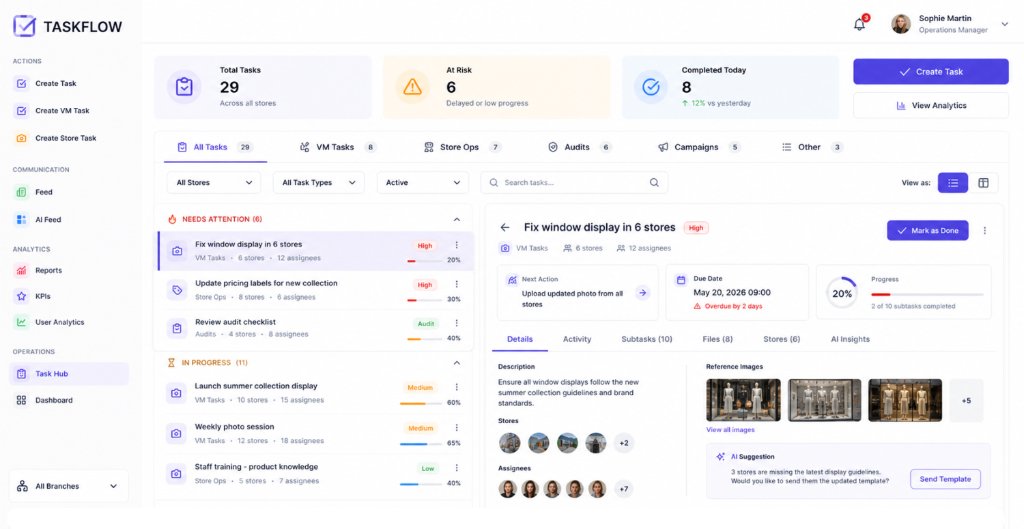
Tasks in STOREE are assigned by store, role, region or employee group. A store manager sees what their store needs to do today, and a district manager sees the same work across their stores. Nobody scrolls through instructions meant for someone else.
Proof from the store floor, not a checkbox
Store teams close a task by submitting a photo. STOREE AI, the STOREE visual merchandising AI, reviews the photo and flags execution gaps. HQ sees what was actually done in each store instead of a list of ticks.
Follow-up that does not depend on someone remembering
Completion, blockers and overdue work are tracked across every location. When a store falls behind, STOREE creates the follow-up and sends it to the responsible person. The AI agent can run these checks on a schedule and report back to the manager.
Tasks that start from the work you already do
A task can come from a written instruction, a message or a workflow. A decision made in a conversation becomes an action on the floor, with an owner and a deadline. Tasks share one data backbone with communication, audits, forms and training, so each store’s execution history stays in one place.
How it works
Create the task
Write the instruction, or turn a message or workflow into a task. Set the deadline and say what proof you need.
Assign and send
Choose stores, roles, regions or groups. Each person sees only the tasks that apply to them.
Track and close
Stores submit photos, AI reviews them, and STOREE follows up on anything late or incomplete until it is done.